
POSTEngineering log
All postsMeet Sandpi: A Persistent Cloud Workspace for Coding Agents
- Written by
- Sandbox0 Team
- Published
A coding agent can work for minutes or hours, but the interface we use to reach it is still often tied to one laptop, one terminal, or one browser tab.
Close the laptop and the runtime may disappear. Switch devices and the conversation is somewhere else. Restart the process and the files may still exist, but the active harness, its native session history, and the browser it was debugging through no longer line up.
We wanted to see what the experience would feel like if the whole coding environment lived in a persistent cloud Sandbox instead.
That experiment became Sandpi, an open-source Sandbox0 side project. Sandpi runs the official coding-agent harness in a Sandbox0 Sandbox, keeps its Workspace in the persistent writable RootFS, and lets you continue the same native session from the Web, desktop, or mobile. Codex is the first supported coding agent.
Architecture note (September 2026): Sandpi now stores the Environment Workspace directly in the Sandbox0 sandbox's persistent writable RootFS. The SandboxVolume and S0FS storage path described in the original launch article has been retired. Manual and scheduled backups now use named RootFS snapshots.
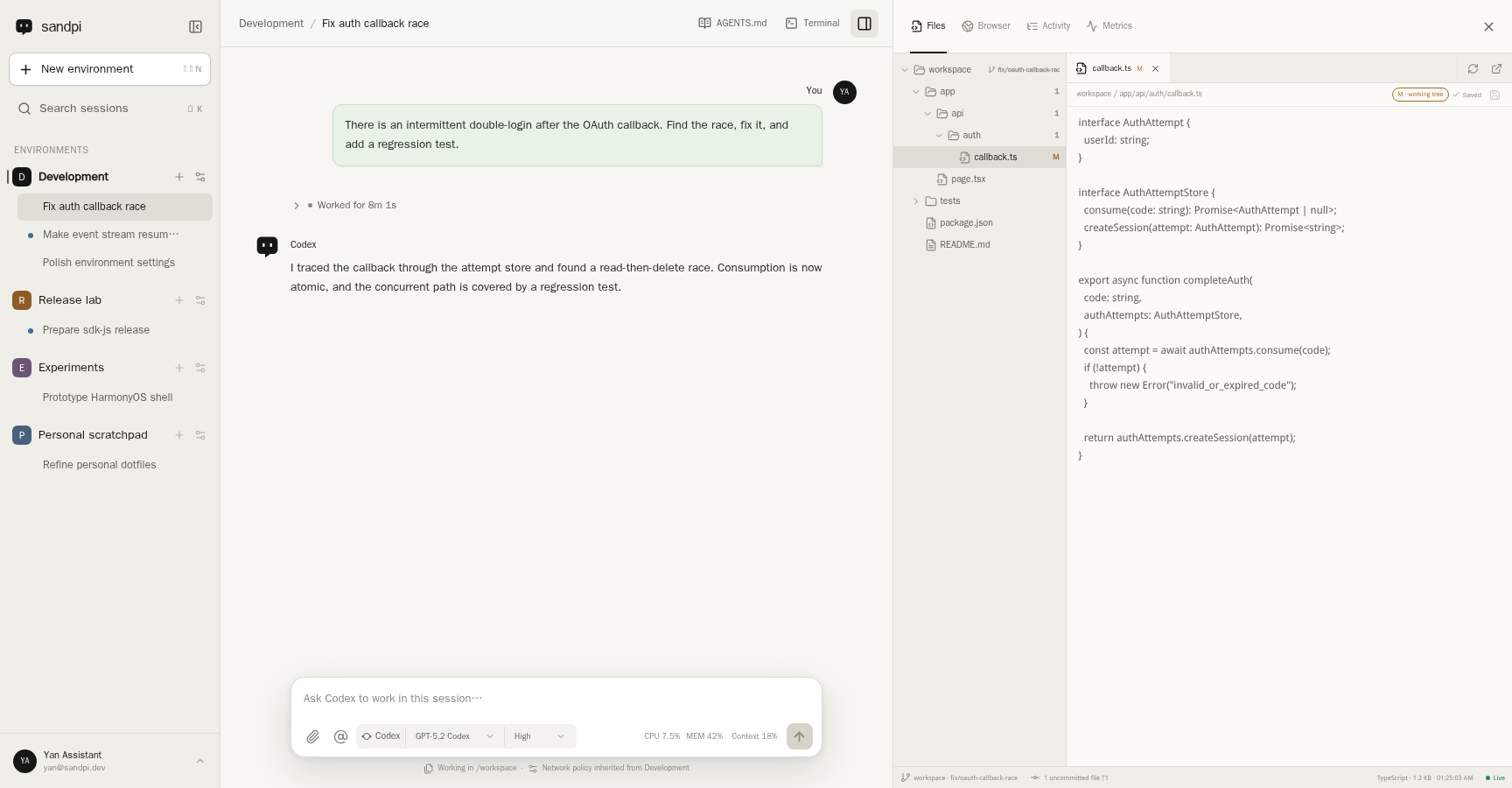
A native Codex session beside the files in its persistent Workspace. The screenshot uses public fixture data.
The Idea: Make the Environment Durable#
Sandpi is not designed around a chat tab. Its main unit is an Environment.
An Environment keeps the pieces that should travel together inside one boundary:
textEnvironment
├── Sandbox with a persistent writable RootFS
├── native coding-agent harness and provider account
├── network policy and egress credentials
├── terminal, shared Browser, files, Git state, and runtime metrics
├── durable Automation Schedules
└── many native coding-agent Sessions
This distinction matters. Two Sessions that belong to the same project can share files, tools, browser state, and execution context. Work that needs a different repository, provider account, network policy, or trust boundary belongs in another Environment.
The client is deliberately lightweight. The coding-agent process, terminal, filesystem, and Playwright browser all run in the cloud. Disconnecting a client does not tell the agent to stop, and an active Turn prevents Sandpi's idle policy from pausing the Environment underneath it. When the Environment is later paused, its durable state remains available for the next resume.
Keep the Harness Native#
There are many ways to put a UI in front of a coding agent. The tempting shortcut is to translate every provider into a generic chat protocol and store a second copy of the conversation in the product database.
Sandpi takes the opposite approach.
It runs the official harness without forking or patching it. The Codex integration speaks the native app-server protocol, and Codex remains authoritative for its Threads, Turns, model catalog, reasoning options, history, tools, Skills, MCP configuration, and approvals.
Sandpi stores an opaque reference to the native Session, not a replacement transcript. Native session state lives with the harness on the Environment Workspace. The UI projects the events emitted by that native session and sends input back through the native protocol.
That choice avoids a subtle class of drift. A tool call, approval, steering message, branch, or future harness feature does not need to be reinterpreted into a Sandpi-specific conversation model before it can appear in the product.
It also leaves room for additional coding agents to be integrated on their own terms. Sandpi is not trying to define the lowest common denominator between them.
The Environment Is the Isolation Boundary#
An Environment is intentionally broader than a repository checkout.
It owns one Sandbox with a persistent writable RootFS, one harness account connection, and one set of network and credential rules. Multiple Sessions inside it are collaborative views over that shared state; they are not isolated worktrees.
This creates a simple rule:
- use multiple Sessions when the work should share files and tools
- use multiple Environments when the work should not affect each other
It also makes account separation explicit. Different Environments can connect to different Codex accounts, or use the same account while keeping projects and their security policies apart.
What Sandbox0 Makes Durable#
Sandpi is a product layer built on top of Sandbox0, not a second sandbox runtime.
| Layer | Source of authority |
|---|---|
| Sandpi clients | Presentation and user interaction |
| Sandpi server and PostgreSQL | Users, ownership, Environment control state, native Session references, and optional product entitlements |
| Native coding-agent harness | Sessions, Turns, history, models, tools, Skills, and MCP behavior |
| Sandbox0 | Sandbox lifecycle, persistent writable RootFS, files, snapshots, network enforcement, credential injection, and usage truth |
The Sandpi server uses the official Sandbox0 SDK. It does not read Sandbox0 databases or reach around public platform boundaries.
Inside each Environment, Sandbox0 supplies the runtime and persistent storage primitives:
- the Sandbox runs the native harness and project processes
- the persistent writable RootFS keeps source code, dependencies, native Session state, and the Playwright profile
- root filesystem checkpoints preserve runtime filesystem state across pause and resume
- named RootFS snapshots provide manual or scheduled Workspace backups and restore
- network rules constrain outbound destinations
- egress authentication injects supported credentials only into matching traffic, so those secrets do not need to live in the repository or browser
Sandbox0 encrypts persisted RootFS objects at the application layer before they reach object storage. This is server-side protection rather than end-to-end encryption: the active Sandbox0 runtime still needs the installation key to restore and mount the data.
One Browser for the Human and the Agent#
Browser debugging becomes awkward when the human and the agent see different tabs, cookies, or login state.
Sandpi embeds the official Playwright Dashboard and gives every Environment one shared persistent default session. The human uses that browser through the Sandpi UI; the coding agent uses the same session through the official Playwright CLI.
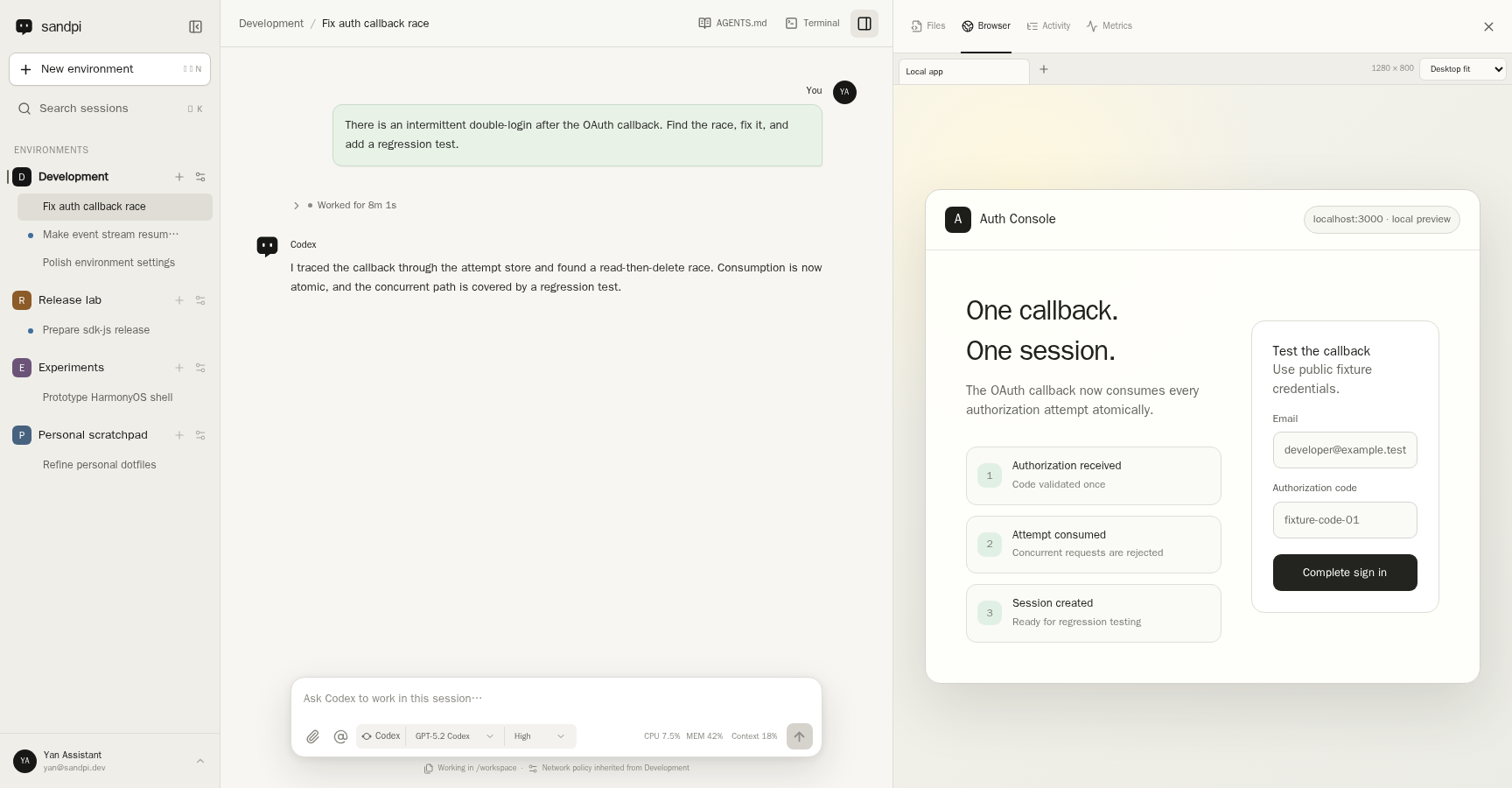
The Browser tab and the coding agent see the same tabs, viewport, and persistent profile.
This enables a useful handoff. A human can complete an interactive login, navigate to the problem, and then ask the agent to continue from the exact same page. The agent can inspect or change the page, and the human sees the result without moving cookies or exporting browser state.
The shared profile is part of the security boundary. It persists in the writable RootFS, and Workspace backups include it. Anyone who can restore that backup should be treated as having access to the Environment's logged-in browser state.
Loopback URLs also behave like remote-development URLs should: localhost in the embedded Browser resolves inside the cloud Sandbox, where the application under test is actually running.
Recovery Without Blind Replay#
Durable files are only one part of recovery. An in-flight coding-agent Turn can perform external side effects, so automatically submitting the same prompt again after a process failure is unsafe.
Sandpi separates durable state from ephemeral execution:
- Workspace files, native Session history, and the browser profile survive runtime replacement
- process memory, sockets, live pages, and an in-flight Turn are not treated as durable checkpoints
- after a Sandbox-caused interruption, Sandpi may run one visible, bounded recovery Turn on the same native Session
- that recovery Turn inspects the persisted conversation and Workspace before continuing anything unfinished
- the original user request is never silently replayed
If the user explicitly interrupted the work, or the recovery Turn also fails, automatic continuation stops.
This is less magical than pretending every operation is replay-safe, but it is a much stronger foundation for real coding work. The durable filesystem shows what happened; the native Session preserves the conversation; and recovery remains visible to the user.
Controls Around the Workspace#
The Environment settings bring the runtime controls next to the work they protect.
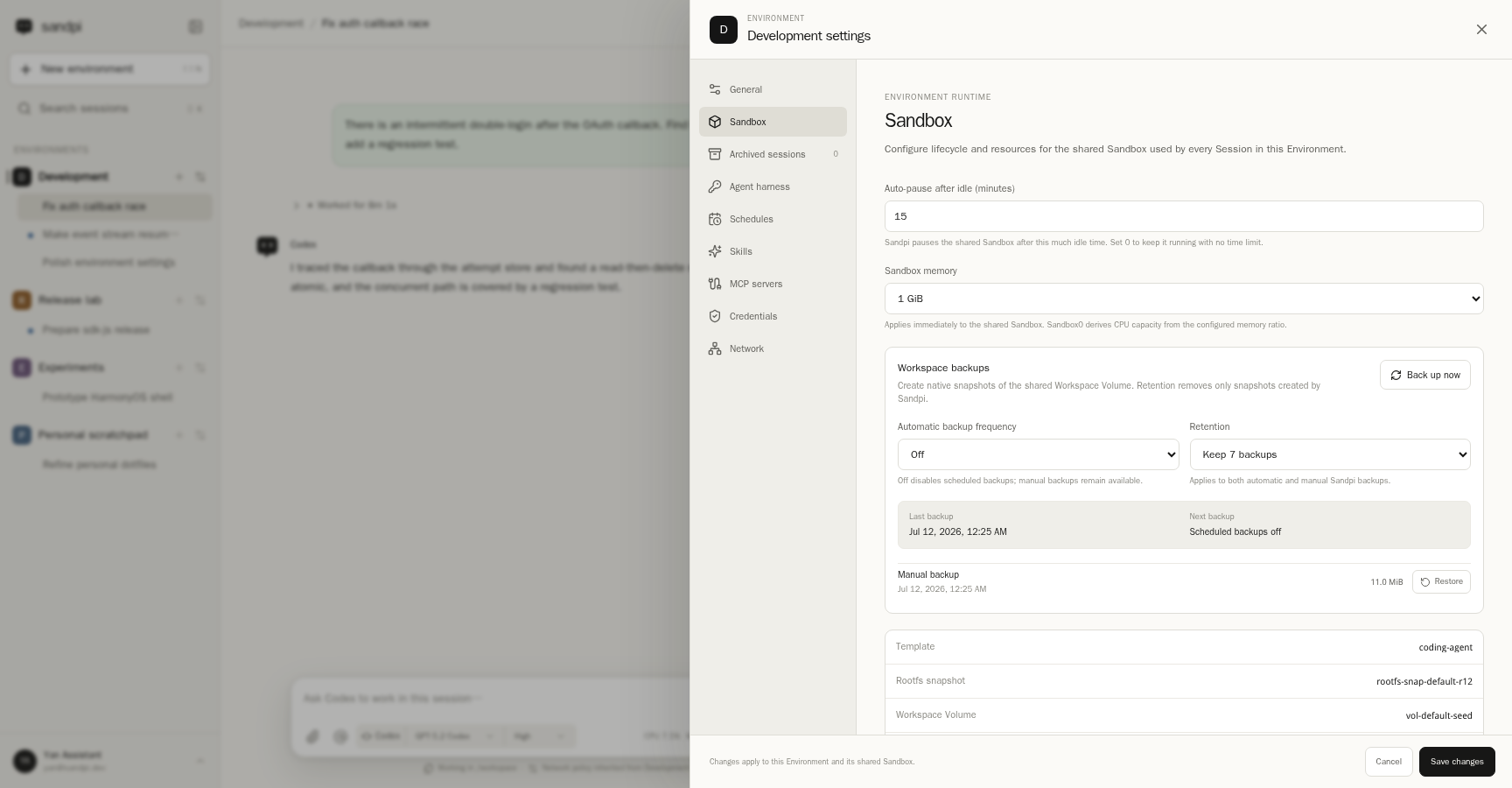
Environment-scoped Sandbox resources, idle pause, backups, retention, and restore.
Today an Environment can configure its Sandbox resources and idle-pause policy, create or schedule Workspace backups, retain a bounded history, and restore a selected snapshot. It can also define network destinations and Sandbox0-backed egress credentials.
The Codex account credential follows a separate path. Sandpi encrypts the Environment credential source in PostgreSQL and materializes it into memory-backed runtime storage when the harness starts. The persistent Workspace contains a link to that ephemeral material, not the plaintext credential body.
These controls do not make an agent harmless. A coding agent can still exercise every destination, tool, browser login, and credential explicitly granted to its Environment. The point is to make that authority scoped and inspectable instead of ambient.
What Works Today#
Sandpi is already useful as a daily remote coding workspace:
- native Codex login, model and reasoning discovery, Session history, branching, same-Turn steering, tools, Skills, MCP, approvals, and supported slash commands
- a persistent multi-Environment and multi-Session UI
- live Workspace files with Monaco editing, media previews, Git changes, and file events
- an Environment terminal, runtime metrics, idle pause, and manual pause or restart recovery controls
- the shared Playwright Browser with desktop, responsive, and mobile viewport modes
- one-time and recurring, time-zone-aware Automation Schedules with durable run history and overlap protection
- per-Environment network policies and egress credential injection
- manual and scheduled Workspace backups, retention, and restore
- built-in single-user administration or OIDC for multi-user deployments
The same product UI and API are used by the Web app and first-party native shells for iOS, iPadOS, Android, OpenHarmony, Windows, and macOS. The agent keeps running in the cloud; clients are interchangeable ways to reach it.
What Is Still Deliberately Limited#
Sandpi is pre-1.0, and Codex is currently the only implemented harness.
Sessions in one Environment share a mutable Workspace and provider identity. If two pieces of work must not touch each other's files or credentials, they need separate Environments rather than two Sessions in the same one.
Sandpi also does not hide infrastructure requirements. Self-hosting currently needs a Sandbox0 deployment, PostgreSQL, Node.js 24, and a current coding-agent template with the official Playwright CLI and Chromium. The API is versioned under /api/v1, but it may still change between pre-1.0 releases.
These limits are written down because the project is meant to be inspectable. Sandpi is Apache-2.0 licensed, its OpenAPI contract is generated from the real server routes, and the architecture documents cover the recovery, scheduling, browser, credentials, and usage boundaries in detail.
Why Build This as a Side Project?#
Sandbox0 is infrastructure. It should provide general building blocks for isolated execution, persistent storage, lifecycle, networking, credentials, and usage without assuming one product experience.
Sandpi gives us a demanding product that composes those building blocks end to end.
It pressures pause and resume behavior because a coding session may span days. It pressures storage because source trees, native harness state, browser profiles, and backups all matter. It pressures security boundaries because a useful agent needs both network access and credentials. It pressures recovery because blindly replaying an ambiguous coding operation is not acceptable.
Keeping Sandpi separate lets both projects stay honest: Sandbox0 remains a reusable platform, while Sandpi can make opinionated product decisions about Environments, Sessions, clients, and the native coding-agent experience.
Try Sandpi#
Open sandpi.ai to see the hosted product, or visit the Sandpi repository on GitHub for the source, screenshots, self-hosting guide, OpenAPI contract, and architecture documentation.
Sandpi is a side project, but it is also the clearest demonstration of what persistent cloud Sandboxes can make possible: your coding agent, its native history, its files, its browser, and its security boundary available wherever you continue the work.